


Mobile Device Support
A Strategic Guide for Modern Enterprises
Mobile devices have evolved from convenience tools to mission-critical enterprise endpoints. Whether users are checking a line-of-business app from their smartphone at home or handling guided field tasks on a tablet, mobile device support moves from “nice to have” to core IT capability.

As hybrid work solidifies, this shift is accelerating fast. The mobile device management (MDM) market already reached USD 7.67 billion in 2024 and is projected to hit USD 28.37 billion by 2030—a compound annual growth of 24.5 % (Grand View Research)
In this article, we explore why mobile device support deserves strategic attention, the unique challenges IT teams face, and the capabilities required to deliver seamless mobile experiences. We cover market dynamics, security considerations, real-world use cases, and practical implementation strategies—plus how RemoteCall fits into your mobile support ecosystem.
The Rising Stakes for Mobile Device Support
Mobile devices aren't auxiliary anymore. They're where work happens—from CRM updates during client visits to field technicians troubleshooting equipment with specialized apps. Yet many IT organizations still approach mobile support with desktop-era thinking, leading to frustrated users and security gaps.
📑 Table of Contents
- Why Mobile Support Differs From Desktop
- What Enterprise Mobile Support Must Deliver
- Enterprise Challenges That Can't Be Ignored
- Core Capabilities Every Enterprise Should Demand
- Where RemoteCall Fits Your Stack
- Implementation Best Practices
- Frequently Asked Questions
🚀 Ready to transform your remote support capabilities?
The numbers tell the story:
→ 24.5% CAGR: Compound annual growth rate for mobile device management
→ $3.1B → $8.2B: Remote support tool market expansion through 2033
→ 15%+ annual growth: BYOD market trajectory over the next decade
"This explosive growth isn't just about more devices. It reflects a fundamental shift in how enterprises operate."
Why Mobile Support Differs From Desktop
1. Mobile devices are primary work tools. For sales teams, field service technicians, and remote workers, smartphones and tablets aren't supplements—they're the main interface for critical workflows. When a mobile app fails, work stops.
2. Loss and theft create urgent security scenarios. A stolen laptop is concerning; a lost smartphone containing corporate data and active sessions can be catastrophic. Public sector agencies have reported thousands of unaccounted-for mobile devices, each representing potential security exposure.
3. Legacy tools hit walls. Traditional remote access software struggles with mobile OS sandboxing, restrictive permission models, and the bewildering variety of Android OEM customizations. What works seamlessly on Windows often fails on mobile platforms.
4. User experience demands are higher. Mobile users expect immediate, frictionless experiences. Lengthy permission dialogs, multiple authentication steps, or clunky interfaces generate resistance and abandonment.
These distinctions mean mobile support requires purpose-built solutions and strategies.
What Enterprise Mobile Support Must Deliver
Effective mobile device support isn't a single feature—it's an integrated capability set addressing diverse needs. It includes:
1. Remote diagnostics & logging — gathering crash logs, battery, and network data to pre-triage issues.
2. Secure screen sharing/control — guiding users in real time within strict OS permissions.
3. Unattended maintenance — pushing updates or patches on managed (corporate) devices.
4. Configuration & app management — deploying profiles, installing or updating apps.
5. Security actions — lock, wipe, or lost-mode activation to protect data.
6. Guided or visual support — co-browsing, AR pointers, or step-by-step overlays.
7. Integrations — links with Mobile Device Management (MDM), User Experience Management (UEM), Information Technology Service Management (ITSM), and Customer Relationship Management (CRM) tools for unified workflows.
💡 Pro Tip: Mobile support complements MDM, but doesn’t replace it. MDM enforces policy; remote support handles the human moment.
Enterprise Challenges That Can't Be Ignored
Mobile support presents distinct challenges that require thoughtful solutions.
→ Fragmentation Across Platforms
The Challenge: Android's ecosystem spans countless OEM interfaces, OS versions, and custom skins. iOS maintains tighter control but evolves rapidly. Supporting devices across this fragmented landscape means dealing with inconsistent behaviors, varying feature availability, and unpredictable compatibility issues.
The Solution: Implement continuous testing across representative device pools, develop platform-specific optimization strategies, and build graceful degradation mechanisms. Maintain a compatibility matrix and prioritize support based on your user device distribution. Leverage cross-platform frameworks where appropriate while keeping native capabilities available for critical functions.
→ Security & Compliance
Enterprises operate across regions with vastly different network conditions. Support systems must handle variable bandwidth, high latency, and intermittent connectivity through adaptive streaming, session resume, and intelligent fallback modes.
The Challenge: Every remote session becomes a potential attack vector if not properly secured. Mobile devices often contain sensitive corporate and personal data, operate on untrusted networks, and face heightened physical security risks. Regulatory requirements like GDPR, HIPAA, and regional data privacy laws add layers of complexity.
The Solution: Build security into the foundation, not as an afterthought. Implement:
✓ End-to-end encrypted connections (TLS 1.3+)
✓ Role-based access controls with privilege principles
✓ Complete session logging and audit trails
✓ Compliance frameworks for GDPR, HIPAA, and regional regulations
✓ Regular security audits and penetration testing
✓ Zero Trust architecture principles
→ The Bring Your Own Device (BYOD) Complexity
The Challenge: Bring-Your-Own-Device policies offer flexibility and cost savings, driving 15%+ annual market growth. But supporting personal devices raises thorny questions: What permissions are reasonable? How do you balance corporate needs with individual privacy? What data can support teams access? Many employees already use personal devices for work without formal authorization, creating shadow IT risk and compliance gaps.
The Solution: Establish clear, transparent BYOD policies that define boundaries and expectations upfront. Deploy technical solutions like containerization and app-level management that respect personal device usage while protecting corporate data. Invest in user education to build trust and understanding. Create defined scope limitations that specify exactly what support can and cannot access, and communicate these clearly to all stakeholders.
→ OS Permission Constraints
The Challenge: Mobile operating systems impose strict permission models that limit what remote support can accomplish. iOS enforces rigorous sandboxing, restricts remote control capabilities, requires explicit user consent for screen sharing, and allows minimal background access. Android presents OEM-specific implementations, periodic reauthorization requirements, permission model variations across versions, and custom ROM considerations that complicate standardization.
The Solution: Design support workflows that work with OS constraints rather than fighting them. Build user consent flows that are transparent and minimally intrusive. Educate users on why permissions are necessary and what they enable. Develop fallback methods for scenarios where full remote control isn't possible—such as guided instructions, visual overlays, or diagnostic data collection. Test extensively across OS versions and OEM implementations to identify limitations early.
→ Global Scale and Network Variability
The Challenge: Enterprises operate across regions with vastly different network conditions—from high-speed 5G in urban centers to congested 3G in remote locations. Variable bandwidth, high latency, packet loss, and intermittent connectivity can disrupt support sessions, frustrate users, and prevent issue resolution. Time zone differences and regional infrastructure limitations add operational complexity.
The Solution: Implement adaptive streaming technology that adjusts video quality and data transfer based on available bandwidth. Build session resume capabilities that recover gracefully from disconnections. Create intelligent fallback modes—switching from video to screenshots or diagnostic-only modes when bandwidth is constrained. Enable bandwidth optimization through compression and selective data transmission. Deploy regional infrastructure with redundancy and failover capabilities to minimize latency and ensure availability.
Core Capabilities Every Enterprise Should Demand
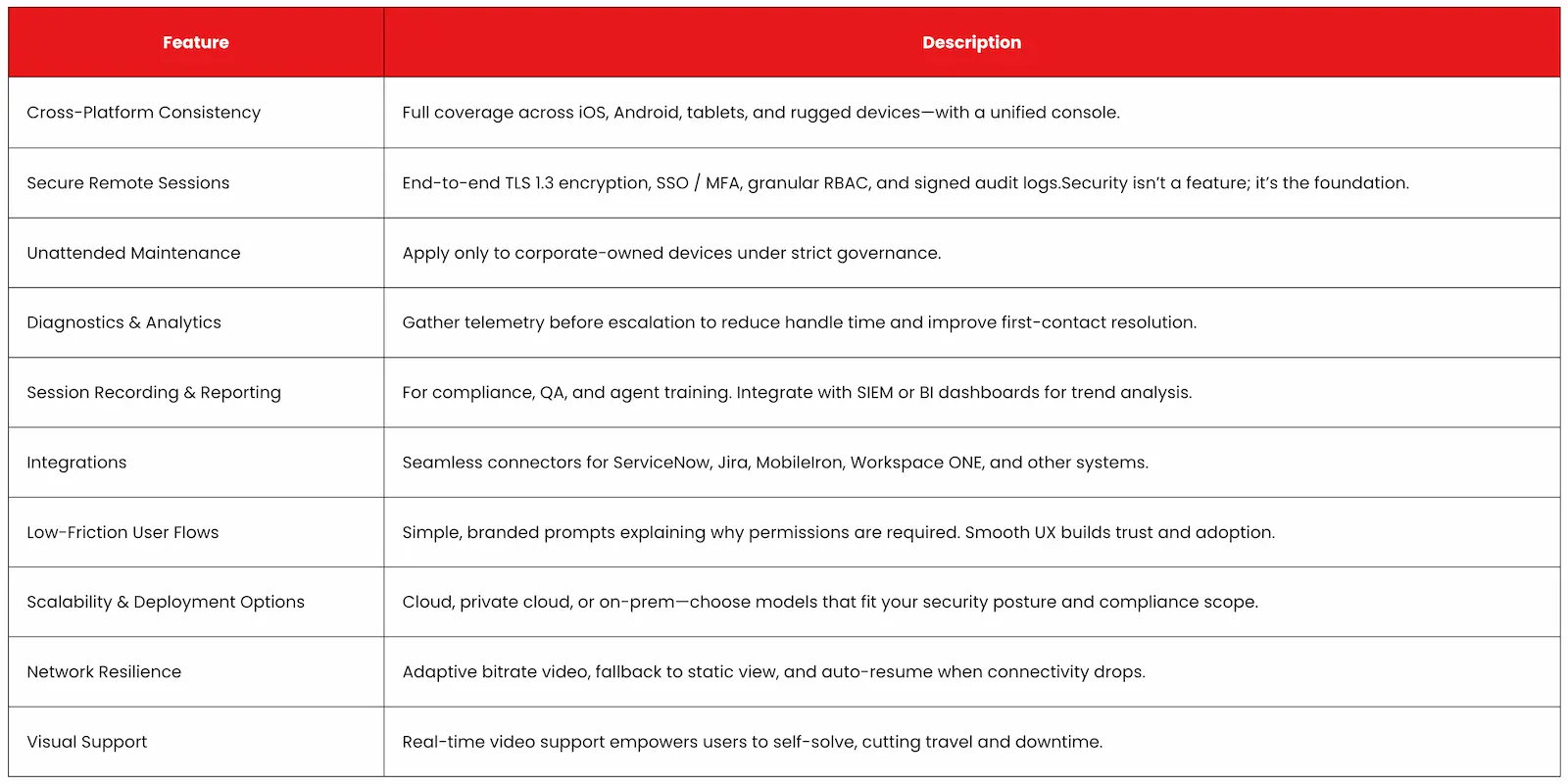
Where RemoteCall Fits Your Stack
RemoteCall doesn't replace your MDM or UEM—it complements them. Think of MDM as policy enforcement and bulk management, while RemoteCall provides the real-time, interactive layer.
→ Bridging the Gap: MDM excels at configuration, compliance, and security policy. RemoteCall handles live diagnostics, user engagement, and the human side of mobile support.
→ Deployment Flexibility: Whether your security posture demands on-premises deployment, private cloud, or public cloud, RemoteCall adapts to your architecture.
→ Proven Results: Organizations implementing RemoteCall for mobile support report 30-50% reductions in ticket resolution time, fewer escalations, and measurably improved user satisfaction scores.
→ Security Alignment: Built-in encryption, session logging, integration capabilities, and cross-platform support align with enterprise security requirements from the ground up.
Implementation Best Practices
Technology alone doesn't guarantee success. Implementation approach matters enormously.
1. Plan with consent and clarity: Design transparent permission prompts and communicate their purpose. Users cooperate when they trust the process.
2. Apply least-privilege access: Agents get exactly what they need—nothing more. Use role segmentation and automatic session timeouts.
3. Train and empower your agents: Well-trained teams reduce escalations. Pair live simulations with recorded sessions for learning loops.
4. Integrate deeply: Embed RemoteCall buttons inside apps or helpdesk tickets. Every context switch costs seconds—and user patience.
5. Measure what matters: Track metrics like MTTR, first-contact resolution, reopen rate, and CSAT. Turn insights into process improvements.
6. Design for global reality: Test on slow networks and across time zones. RemoteCall’s adaptive streaming ensures continuity.
7. Avoid support sprawl: Consolidate overlapping tools to cut costs, improve analytics, and simplify training.
Mobile device support has matured from tactical necessity to strategic capability. The organizations winning in hybrid work environments treat mobile support as integral to user experience, security posture, and operational efficiency.
The right approach combines purpose-built tools, clear governance, security-first design, and user-centric implementation. Zero Trust models, AI-based anomaly detection, and adaptive support workflows are becoming standard expectations rather than differentiators.
Your mobile workforce depends on devices that work reliably and securely. IT teams depend on tools that enable effective support without drowning in complexity. RemoteCall bridges that gap.
Experience RemoteCall's Mobile Support
🚀 Ready to transform your mobile device support from reactive firefighting to proactive experience management?
Experience firsthand how integrated remote support, secure mobile access, and intelligent diagnostics can reduce resolution times while improving user satisfaction.
Transform Your Support. Connect with RemoteCall.
Frequently Asked Questions
Q: How does mobile support differ between iOS and Android?
A: iOS enforces strict, user-driven consent for screen sharing; Android allows broader control but varies by OEM. Effective tools abstract these differences for a consistent agent experience.
Q: Can you support devices without user interaction?
A: On corporate-managed devices, some unattended access is possible, though OS constraints still apply. Most scenarios require at least periodic user confirmation.
Q:What about security risks?
A: Risks include session hijacking, unauthorized access, and privilege misuse. Mitigation requires strong encryption, multi-factor authentication, role-based access, session timeouts, and comprehensive audit logging.
Q: How do BYOD policies affect deployment?
A: BYOD introduces privacy concerns and limited control. Define clear boundaries about what support can access, maintain transparent policies, and implement technical controls that respect personal device usage.
Q: Why not rely solely on MDM?
A: MDM handles policy enforcement, provisioning, and bulk updates. Remote support adds real-time troubleshooting, user guidance, and interactive problem-solving capabilities that MDM wasn't designed to provide.
Want to know more about RemoteCall?
- Explore Industry Use Cases → Explore Case Studies by Industry
- Subscribe to our Newsletter → RSUPPORT Report on LinkedIn